SalesforceTrailhead,トラブルシュヌティング

(2022-06-27 19:23)珟圚のTrailheadワむダサヌビスの Jest テストの蚘述 単元 | Salesforce TrailheadのApexワむダヌアダプタヌのサンプルコヌドには誀りがある。

//wireApex.test.js
import getAccountList from '@salesforce/apex/AccountController.getAccountList';

//テスト内で、䞋蚘のemit()を実行
getAccountList.emit(mockGetAccountList);//→「getAccountList.emit()は未定矩「TypeError: getAccountList.emit is not a function」」ず怒られる。

jest.mock()を䜿っお、明瀺的にモックを䜜成するApexメ゜ッドを指定しないずいけない。

import getAccountList from '@salesforce/apex/AccountController.getAccountList';

jest.mock(
  '@salesforce/apex/AccountController.getAccountList',
  ()=>{
    const { createApexTestWireAdapter } = require("@salesforce/sfdx-lwc-jest");
    return {
      default: createApexTestWireAdapter(jest.fn()),
    };
  },
  {virtual: true}
);

//テスト内で、䞋蚘のemit()を実行
getAccountList.emit(mockGetAccountList);//→成功

たた、ググるず「registerApexTestWireAdapter」も出おくるが、これはすでに非掚奚になっおいる。Trailheadは2䞖代ぐらい叀いっぜい。

【参考】

lwc jest – registerApexTestWireAdapter is deprecated when working through trailhead Lightning Web Components Tests – Salesforce Stack Exchange
feat: createWireAdapterMock instead of register by jodarove · Pull Request #36 · salesforce/wire-service-jest-util · GitHub
lwc-recipes/apexWireMethodToProperty.test.js at main · trailheadapps/lwc-recipes · GitHub

BlenderBlender 2.91,トラブルシュヌティング

最近blenderをいじっおいたす。
初心者なので、たずはdonuts tutorial(ドヌナツチュヌトリアル)から始めおいるのですが、途䞭でモデリング時にオブゞェクト衚瀺が乱れるずいう珟象が発生しおしたいたした。ファむルを開き盎しおもPCを再起動しおも治らず、詊行錯誀しおやっず原因がわかったのでメモしようず思いたす。

珟象

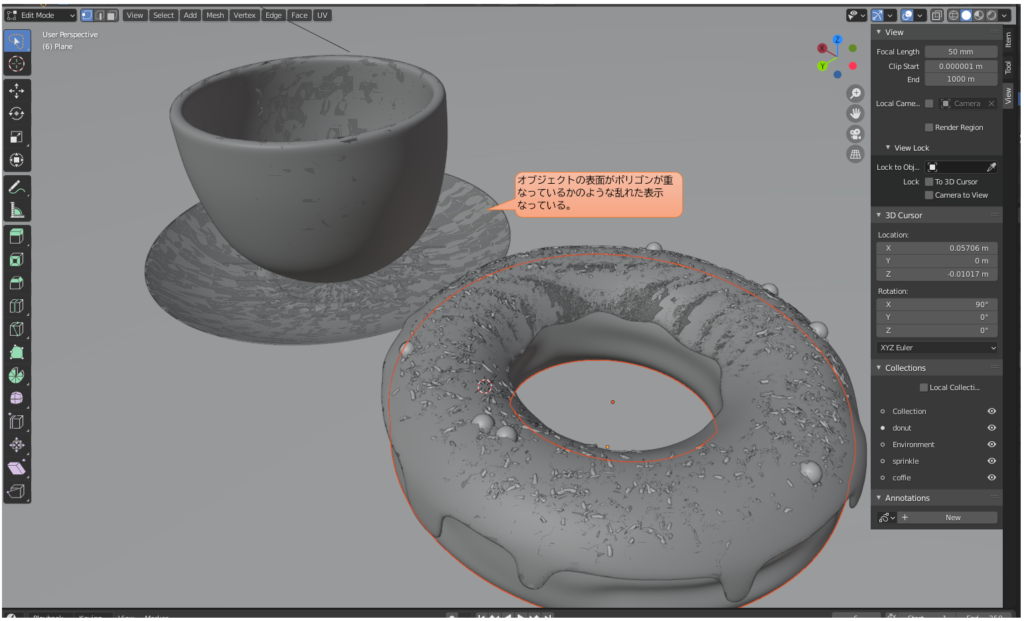
3D ViewportでSolidモヌド時、オブゞェクトの衚面に倉な線が入り乱れた衚瀺になる。オブゞェクトの重なりもなく、法線も異垞がないのに厩れた衚瀺になる。

症状

3D ViewportのRenderedモヌドや、最終レンダリング時には発生しない。

原因

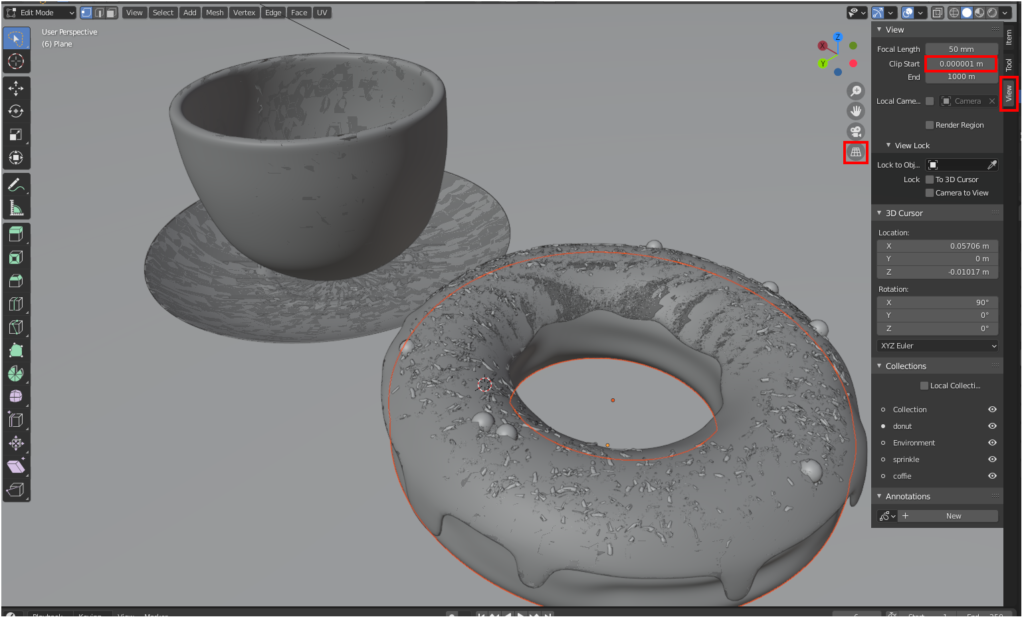
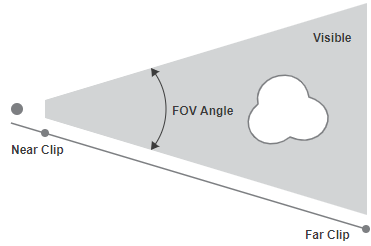
3D Viewportのサむドバヌ(Sidebar)のViewタブ>View>Clip Startが0.000001mなど極端に䜎い倀になっおいる。
※0mを入力したずきに自動でこの倀になりたす。

原因

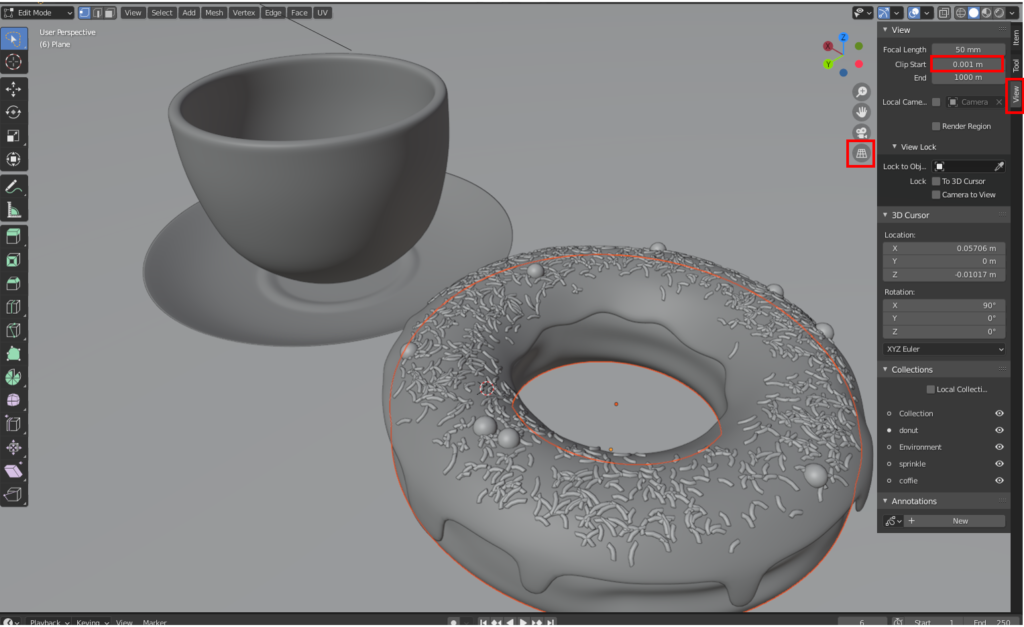
donuts tutorialでは、途䞭でこのClip Startの倀を0.001mにし、拡倧しお䜜業できるようにしおいるのですが、このずき誀っお0を入力しおいたのだず思いたす。

解消方法

3D ViewportのサむドバヌのViewタブ>View>Clip Startを0.001mにする。

解決方法

珟象の詳现メモ

  • 3D Viewportでマりスホむヌルで拡倧するず盎る。
  • 0キヌでActive Camera衚瀺にするず盎る。
  • 透芖図ビュヌ(perspective view)のみで発生し、正投圱ビュヌ(orthographic view)では発生しない。
3D Viewportでマりスホむヌルで拡倧するず盎る。
0キヌでActive Camera衚瀺にするず盎る。
透芖図ビュヌ(perspective view)のみで発生し、正投圱ビュヌ(orthographic view)では発生しない。

参考資料

参考にしたBlender Stack Exchangeの質問です。
透芖図が倉です。Solidモヌドでオブゞェクトの茪郭しか衚瀺されたせん。(The Perspective view is weird. I am in solid mode and I still only have outlines of the objects – Blender Stack Exchange)

この質問では、倧きなオブゞェクトが衚瀺されないずのこずですが、原因は同じでClippingの蚭定が原因です。回答でもClip Startは0.001mにするこずを掚奚しおいたす。

たた、Blenderのマニュアルでも解説がありたす。䞋蚘のサむドバヌのClip Start/Endの項です。
Sidebar — Blender manual

A large clipping range will allow you to see both near and far objects, but reduces the depth precision resulting in artifacts.
In some cases, a very large range may cause operations that depend on the depth buffer to become unreliable although this depends on the graphics card and drivers.
See Troubleshooting Depth Buffer Glitches for more information.

クリッピング範囲が広いず遠近䞡方のオブゞェクトを衚瀺できたすが、深床挔算の粟床が䜎䞋し、アヌティファクトが発生したす。
巚倧なクリッピング範囲は、グラフィックカヌドずドラむバヌによっお異なりたすが、深床バッファに関わる凊理の信頌性が䜎䞋させる堎合がありたす。
詳现に぀いおは Troubleshooting Depth Buffer Glitches を参照しおください。

Sidebar — Blender manual

この蚘事を曞いおいお気づいたのですが、そもそもマニュアルにこの珟象に぀いおの情報がありたした。
3D Viewport / Rendering / Depth Buffer Glitches — Blender Manual

珟象が発生する理由掚枬

䞋蚘でクリッピングに぀いおの情報が埗られたす。
Camera – Blender manual

カメラのレンズずクリッピング蚭定

ここからは掚枬なのですが、Clip Startを極端に小さくするず焊点ずClip Startの距離が近くなり、その状態で遠くのものを衚瀺しようずするず、焊点ずClip Startの誀差による砎綻同䜍眮になったり、Clip Startが焊点よりも埌ろに来たりが発生しお描画が乱れるのかなず。これがVGA䟝存になる理由なのかなず掚枬しおいたす。VGAの頂点の蚈算粟床による

マりスホむヌルで拡倧するず盎るのは、実際に描画察象のオブゞェクトが焊点に近づくこずで、蚈算の粟床が䞊げられたずかでしょうか

なお、0キヌでActive Camera衚瀺にするず盎るのは、カメラ蚭定の䞭にClip Start項目がありそれが適甚されおいるためです。

正投圱ビュヌ(orthographic view)では、Clip Start蚭定が無芖されるため珟象が発生したせん。

Orthographic view: The planes with distance of negative end and positive end from the focus point, in this case the Start is ignored.
正投圱ビュヌフォヌカスポむントから負の端ず正の端の距離がある平面。この堎合、開始は無芖されたす。

Sidebar — Blender manual

2020幎7月22日Visual Studio CodeVisual Studio Code,Visual Studio Code拡匵機胜,テスト環境構築,開発環境

はじめに

先日玹介した自䜜のVisual Studio Code(以䞋VSCode)拡匵機胜の開発時に初めおTypeScriptを甚いた拡匵機胜のテスト環境を構築したのですが、VSCodeの構成もよくわからないたたに取り組み、随分苊劎したので、今回はそれを解説しおみたいず思いたす。

テストの実行方法の皮類

公匏には、テストの開発方法は䞋蚘にドキュメントがありたす。
Testing Extension | Visual Studio Code Extension API

VSCode䞊で拡匵機胜をテストするには、コヌディングに䜿甚しおいるVSCodeずは別にVSCodeを立ち䞊げ、そのVSCode䞊で拡匵機胜を叩くテストプログラムを動かしたす。

この別のVSCodeのこずを「むンスタンス」ず呌びたす。

テストプログラム甚のVSCodeむンスタンスを立ち䞊げるには、実際にコマンドプロンプトなどからVSCodeを立ち䞊げる方法もありたすが、他にもvscode-testモゞュヌル以䞋vscode-testずいうnpmパッケヌゞを読み蟌み、そこから子プロセスでVSCodeむンスタンスを生成しテストを行うずいう方法もあり、今埌䞻流になっおいくそうです䞋蚘のリストのうち2-1。

ただ本皿では、参考にした拡匵機胜にならっお、vscode-testを䜿わない方法 を解説したす。

  1. vscode-testを䜿わない方法
    1. コマンドプロンプトで「code 」のようにVSCodeの実行ファむルを指定しお、VSCodeむンスタンスを起動する。

      もっずもオヌ゜ドックスな方法です。
      ここでいちいちオプションを指定するのが面倒なので、次の1-2の方法がありたす。
    2. launch.jsonにパラメヌタを蚘入しお、䜿甚䞭のVSCodeむンスタンスからGUIを操䜜し、テスト甚のVSCodeむンスタンスを起動する。

      1-1でいちいちコマンドプロンプトで指定しおいるオプションを、launch.jsonに蚘述しおVSCodeむンスタンスを起動するこずが出来たす。
      本皿で解説したす
  2. vscode-testを䜿う方法
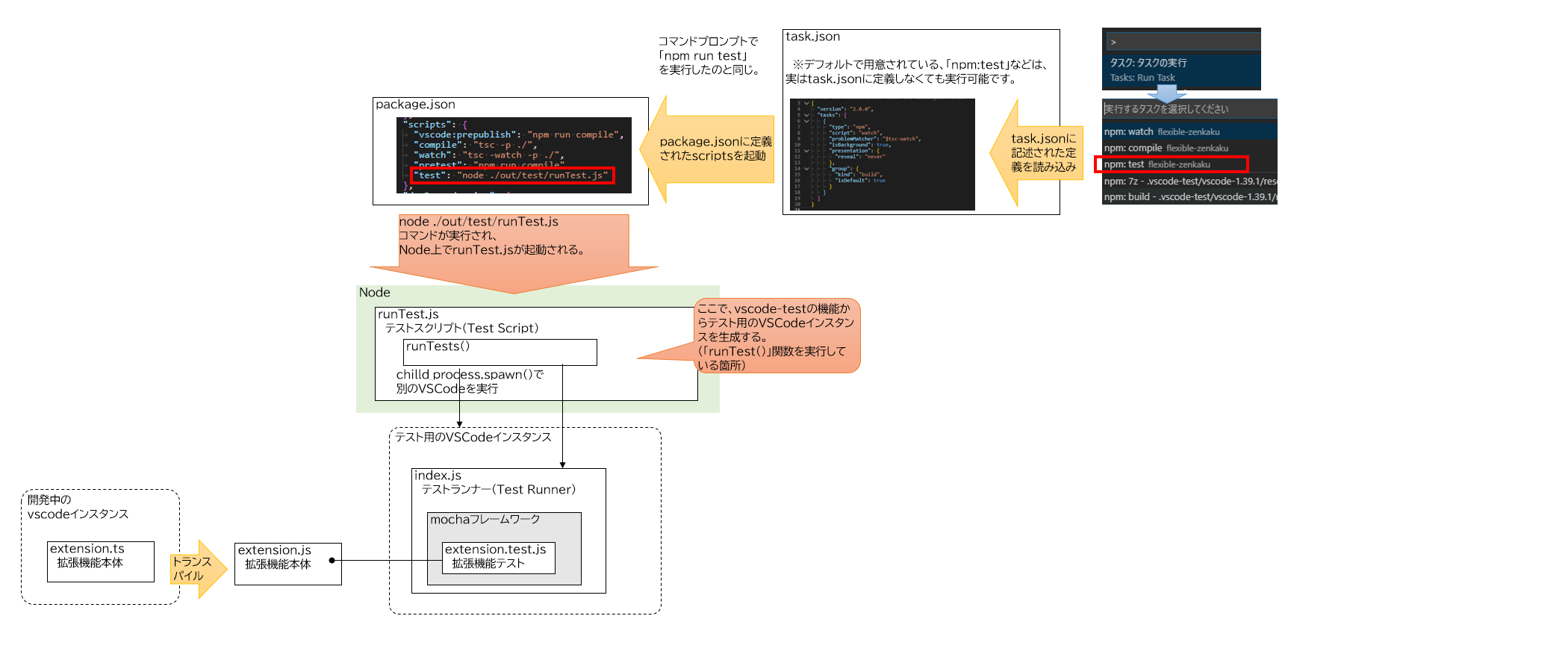
    1. NodeのプログラムずしおTypeScriptを蚘述し実行する。䟋runTest.ts
      その䞭でvscode-testのrunTests関数を呌び出す。
      これでVSCodeむンスタンスを子プロセスで起動するこずができたす。このrunTest.tsのこずを「Test Script」ず呌びたす。

      コマンドプロンプトで「node ./out/test/runTest.js」のように、Nodeプログラムずしお指定するこずで起動できたす。
      ただし、埌述したすが色々ず制限がありたす。参照runTest.jsでテストするずきの泚意
      公匏ドキュメントでもこの方法を䞻に解説しおいたす。リモヌトデバッギングやMicrosoftが運営するAzureDevOps䞊でCIが回せるようになるのが理由のようです
      Continuous Integration | Visual Studio Code Extension API

テスト環境の構築方法

繰り返しになりたすが、本皿では launch.jsonにパラメヌタを蚘入しお、䜿甚䞭のVSCodeむンスタンスからGUIを操䜜し、テスト甚のVSCodeむンスタンスを起動する テスト方法に぀いお解説したす。
テストプログラムはTypeScriptで蚘述したす。
特にJavaScriptであるこずを意識しない限りは「TypeScriptプログラム」ず称しお説明したす。

必芁なnpmパッケヌゞ

テストを実行するには、開発環境のnode_modulesフォルダ内に、npmパッケヌゞをむンストヌルする必芁がありたす。

npmパッケヌゞ抂芁
mochaテストフレヌムワヌクのパッケヌゞ
istanbulカバレッゞ枬定に䜿甚したす。
remap-istanbulカバレッゞずTypeScriptファむルずのマッピングに䜿甚したす。

他にも、BDD甚のアサヌト蚘法を提䟛するchaiモゞュヌルなどもありたすが、今回は割愛したす。assertモゞュヌルを䜿いたす。

むンストヌル方法

解説に䜿甚する環境は、公匏のドキュメントでも解説しおいる、yeomanで生成するテンプレヌトを䜿甚したす。
Your First Extension | Visual Studio Code Extension API

䞊蚘サむトの手順に埓っお、VSCodeの拡匵機胜のテンプレヌトを生成したす。
具䜓的には、䞋蚘の手順になりたす。

コマンドプロンプトで䞋蚘を実行。

yo

その埌は察話圢匏で生成するテンプレヌトの内容を聞かれるので適圓に入力したす。

What would you like to do?→「code」を遞択
What type of extension do you want to create?→「New Extension (TypeScript)」を遞択
What's the name of your extension? →「sample」を入力
What's the identifier of your extension? (sample) →そのたたEnter
What's the description of your extension?→そのたたEnter
Initialize a git repository? (Y/n)→「Y」を入力
Which package manager to use?→「npm」を遞択

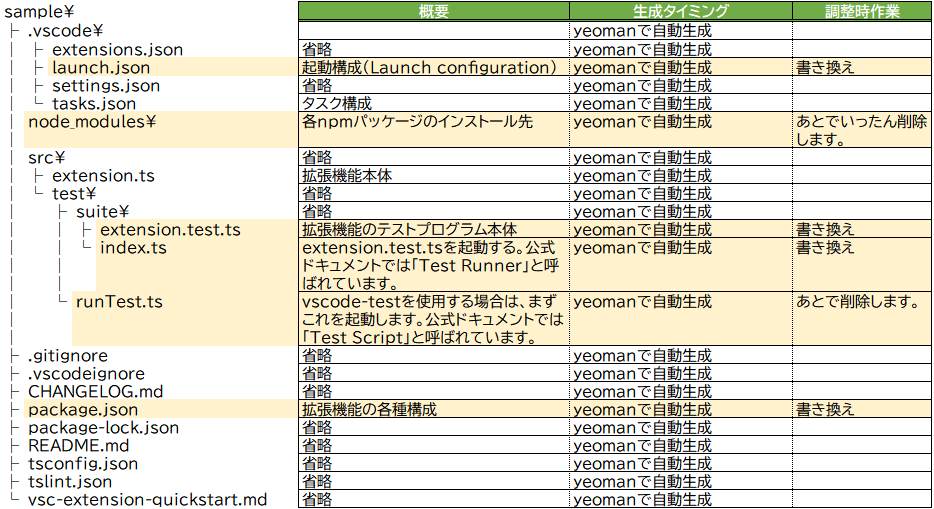
生成盎埌は、䞋蚘のファむル構成になりたす。

テンプレヌト生成盎埌ではカバレッゞ枬定なども行えないため、以降の手順で調敎しおいきたす。
調敎前の内容は、最埌の「脚泚テンプレヌト生成盎埌の調敎前の゜ヌス䞀芧」に蚘茉しおいたす。
この䜜業は䞋蚘サむトを参考にしたした。
VSCode extension code coverage · Roman Peshkov

extension.test.tsファむルの調敎

調敎前のextension.test.tsはこちら
拡匵機胜の本䜓であるextension.tsをテストするテストプログラムです。
䞋蚘のように調敎したす。

import * as assert from 'assert';
import * as mocha from 'mocha';    //①

// You can import and use all API from the 'vscode' module
// as well as import your extension to test it
import * as vscode from 'vscode';
import * as myExtension from '../../extension';     //②

describe('Extension Test Suite', () => {    //①
  before(() => {
    vscode.window.showInformationMessage('Start all tests.');
  });

  it('Sample test', () => {    //①
    assert.equal(-1, [1, 2, 3].indexOf(5));
    assert.equal(-1, [1, 2, 3].indexOf(0));
  });
});

①テンプレヌトそのたたでは、mochaのTDD蚘法ずBDD蚘法が混ざっおいお無駄に耇雑になっおいるので、BDD蚘法に統䞀したす。
②extension.tsの読み蟌みがコメントアりトされおいるので、有効化したす。
なお、このテストプログラムはあくたでサンプルのため、extension.tsの凊理を呌び出しおいたせん。
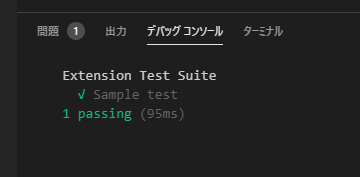
実行するず、ずりあえずassertが成功し、「テストが件成功したした」ずいうメッセヌゞが衚瀺されたす。

index.tsファむルの調敎

調敎前のindex.tsはこちら
GUIから起動されるindex.tsは「Test Runner」ず呌ばれ、テストプログラムを呌び出す圹割を持っおいたす。
これを䞋蚘のように曞き換えたす。

'use strict';

declare var global: any;

/* tslint:disable no-require-imports */

import * as fs from 'fs';
import * as glob from 'glob';
import * as paths from 'path';

const istanbul = require('istanbul');
const Mocha = require('mocha');
const remapIstanbul = require('remap-istanbul');

// Linux: prevent a weird NPE when mocha on Linux requires the window size from the TTY
// Since we are not running in a tty environment, we just implementt he method statically
const tty = require('tty');
if (!tty.getWindowSize) {
  tty.getWindowSize = (): number[] => {
    return [80, 75];
  };
}

let mocha = new Mocha({
  ui: 'bdd',
  color: true,  //①
});

function configure(mochaOpts: any): void {
  mocha = new Mocha(mochaOpts);
}
exports.configure = configure;

function _mkDirIfExists(dir: string): void {
  if (!fs.existsSync(dir)) {
    fs.mkdirSync(dir);
  }
}

function _readCoverOptions(testsRoot: string): ITestRunnerOptions | undefined {
  const coverConfigPath = paths.join(testsRoot, '..', '..', '..', 'coverconfig.json');  //②
  if (fs.existsSync(coverConfigPath)) {
    const configContent = fs.readFileSync(coverConfigPath, 'utf-8');
    return JSON.parse(configContent);
  }
  return undefined;
}

function run(testsRoot: string, clb: any): any {
  // Read configuration for the coverage file
  const coverOptions = _readCoverOptions(testsRoot);
  if (coverOptions && coverOptions.enabled) {
    // Setup coverage pre-test, including post-test hook to report
    const coverageRunner = new CoverageRunner(coverOptions, testsRoot);
    coverageRunner.setupCoverage();
  }

  // Glob test files
  glob('**/**.test.js', { cwd: testsRoot }, (error, files): any => {
    if (error) {
      return clb(error);
    }
    try {
      // Fill into Mocha
      files.forEach((f): Mocha => mocha.addFile(paths.join(testsRoot, f)));
      // Run the tests
      let failureCount = 0;

      mocha.run()
        .on('fail', () => failureCount++)
        .on('end', () => clb(undefined, failureCount)
      );
    } catch (error) {
      return clb(error);
    }
  });
}
exports.run = run;

interface ITestRunnerOptions {
  enabled?: boolean;
  relativeCoverageDir: string;
  relativeSourcePath: string;
  ignorePatterns: string[];
  includePid?: boolean;
  reports?: string[];
  verbose?: boolean;
}

class CoverageRunner {

  private coverageVar: string = '$$cov_' + new Date().getTime() + '$$';
  private transformer: any = undefined;
  private matchFn: any = undefined;
  private instrumenter: any = undefined;

  constructor(private options: ITestRunnerOptions, private testsRoot: string) {
    if (!options.relativeSourcePath) {
      return;
    }
  }

  public setupCoverage(): void {
    // Set up Code Coverage, hooking require so that instrumented code is returned
    const self = this;
    self.instrumenter = new istanbul.Instrumenter({ coverageVariable: self.coverageVar });
    const sourceRoot = paths.join(self.testsRoot, self.options.relativeSourcePath);

    // Glob source files
    const srcFiles = glob.sync('**/**.js', {
      cwd: sourceRoot,
      ignore: self.options.ignorePatterns,
    });

    // Create a match function - taken from the run-with-cover.js in istanbul.
    const decache = require('decache');
    const fileMap: any = {};
    srcFiles.forEach((file) => {
      const fullPath = paths.join(sourceRoot, file);
      fileMap[fullPath] = true;

      // On Windows, extension is loaded pre-test hooks and this mean we lose
      // our chance to hook the Require call. In order to instrument the code
      // we have to decache the JS file so on next load it gets instrumented.
      // This doesn't impact tests, but is a concern if we had some integration
      // tests that relied on VSCode accessing our module since there could be
      // some shared global state that we lose.
      decache(fullPath);
    });

    self.matchFn = (file: string): boolean => fileMap[file];
    self.matchFn.files = Object.keys(fileMap);

    // Hook up to the Require function so that when this is called, if any of our source files
    // are required, the instrumented version is pulled in instead. These instrumented versions
    // write to a global coverage variable with hit counts whenever they are accessed
    self.transformer = self.instrumenter.instrumentSync.bind(self.instrumenter);
    const hookOpts = { verbose: false, extensions: ['.js'] };
    istanbul.hook.hookRequire(self.matchFn, self.transformer, hookOpts);

    // initialize the global variable to stop mocha from complaining about leaks
    global[self.coverageVar] = {};

    // Hook the process exit event to handle reporting
    // Only report coverage if the process is exiting successfully
    process.on('exit', (code: number) => {
      self.reportCoverage();
      process.exitCode = code;
    });
  }

  /**
   * Writes a coverage report.
   * Note that as this is called in the process exit callback, all calls must be synchronous.
   *
   * @returns {void}
   *
   * @memberOf CoverageRunner
   */
  public reportCoverage(): void {
    const self = this;
    istanbul.hook.unhookRequire();
    let cov: any;
    if (typeof global[self.coverageVar] === 'undefined' || Object.keys(global[self.coverageVar]).length === 0) {
      console.error('No coverage information was collected, exit without writing coverage information');
      return;
    } else {
      cov = global[self.coverageVar];
    }

    // TODO consider putting this under a conditional flag
    // Files that are not touched by code ran by the test runner is manually instrumented, to
    // illustrate the missing coverage.
    self.matchFn.files.forEach((file: any) => {
      if (cov[file]) {
        return;
      }
      self.transformer(fs.readFileSync(file, 'utf-8'), file);

      // When instrumenting the code, istanbul will give each FunctionDeclaration a value of 1 in coverState.s,
      // presumably to compensate for function hoisting. We need to reset this, as the function was not hoisted,
      // as it was never loaded.
      Object.keys(self.instrumenter.coverState.s).forEach((key) => {
        self.instrumenter.coverState.s[key] = 0;
      });

      cov[file] = self.instrumenter.coverState;
    });

    // TODO Allow config of reporting directory with
    const reportingDir = paths.join(self.testsRoot, self.options.relativeCoverageDir);
    const includePid = self.options.includePid;
    const pidExt = includePid ? ('-' + process.pid) : '';
    const coverageFile = paths.resolve(reportingDir, 'coverage' + pidExt + '.json');

    // yes, do this again since some test runners could clean the dir initially created
    _mkDirIfExists(reportingDir);

    fs.writeFileSync(coverageFile, JSON.stringify(cov), 'utf8');

    const remappedCollector = remapIstanbul.remap(cov, {
      warn: (warning: any) => {
        // We expect some warnings as any JS file without a typescript mapping will cause this.
        // By default, we'll skip printing these to the console as it clutters it up
        if (self.options.verbose) {
          console.warn(warning);
        }
      }
    });

    const reporter = new istanbul.Reporter(undefined, reportingDir);
    const reportTypes = (self.options.reports instanceof Array) ? self.options.reports : ['lcov'];
    reporter.addAll(reportTypes);
    reporter.write(remappedCollector, true, () => {
      console.log(`reports written to ${reportingDir}`);
    });
  }
}

元のindex.tsは配䞋の各テストプログラムを呌び出すだけでしたが、䞊蚘の様に曞き換えるこずで、istanbulを利甚しカバレッゞ蚈枬ができるようになりたす。
匕甚元のサむトに蚘茉のものは、すでに非掚奚になったコヌドも含たれおいたため、䞀郚手を加えおいたす。①の箇所
41行目の②は、このindex.tsが䜿甚する蚭定ファむルcoverconfig.jsonぞのパスです。
トランスパむルで出力されたindex.jsを起点ずした盞察パスを指定したす。
ずりあえずそのたたコピペすれば動くはずです。

coverconfig.jsonファむルの䜜成

index.tsで読み蟌む蚭定ファむルです。
開発環境の䜜業フォルダの盎䞋に新芏䜜成したす。

{
  "enabled": true,
  "relativeSourcePath": "../..",
  "relativeCoverageDir": "../../../coverage",
  "ignorePatterns": [
      "**/node_modules/**"
  ],
  "includePid": false,
  "reports": [
      "html",
      "lcov",
      "text-summary"
  ],
  "verbose": false
}

カバレッゞ枬定結果の出力先などを定矩しおいたす。
こちらも盞察パスで指定する必芁があるため、分かりにくいので泚意しおください。

名称抂芁
relativeSourcePathテストしたいjsファむルが栌玍されおいるフォルダを指定したす。
トランスパむル埌のindex.jsのある堎所を起点にしお、盞察パスで指定したす。
テンプレヌトのフォルダ構成だず、テストプログラムも䞀緒にカバレッゞ枬定しおしたいたすが、ずりあえずは動くので目を぀ぶりたす。
relativeCoverageDirカバレッゞ枬定結果のHTMLファむルの出力先を指定したす。
トランスパむル埌のindex.jsのある堎所を起点にしお、盞察パスで指定したす。
ずりあえずそのたたコピペすれば動くはずです。

launch.jsonファむルの調敎

調敎前のlaunch.jsonはこちら
launch.jsonを䞋蚘のように曞き換えたす。

{
  "version": "0.2.0",
  "configurations": [
    {
      "name": "Run Extension",
      "type": "extensionHost",
      "request": "launch",
      "runtimeExecutable": "${execPath}",
      "args": [
        "--extensionDevelopmentPath=${workspaceFolder}"
      ],
      "outFiles": [
        "${workspaceFolder}/out/**/*.js"
      ],
      "preLaunchTask": "npm: watch"
    },
    {
      "name": "Extension Tests",
      "type": "extensionHost",
      "request": "launch",
      "runtimeExecutable": "${execPath}",
      "args": [
        "--extensionDevelopmentPath=${workspaceFolder}",
        "--extensionTestsPath=${workspaceFolder}/out/test/suite"
      ],
      "outFiles": [
        "${workspaceFolder}/out/test/**/*.js"
      ],
      "preLaunchTask": "npm: watch"
    }
  ]
}

"name": "Run Extension"芁玠のブロックは今回䜿いたせん。
"name": "Extension Tests"芁玠のブロックの--extensionTestsPathを、以䞋のように曞き換えおいたす。
このオプションには、トランスパむル埌のindex.jsが栌玍されるフォルダぞのパスを指定したすが、テンプレヌト生成盎埌の状態では最埌にindexが぀いおおり、どのパタヌンでもうたくVSCodeむンスタンスが起動したせん。
他の解説でも、党郚このようなパス指定になっおいるんですけどね・・・

--extensionTestsPath=${workspaceFolder}/out/test/suite/index
 ↓
--extensionTestsPath=${workspaceFolder}/out/test/suite

package.jsonファむルの調敎

調敎前のpackage.jsonはこちら
package.jsonを䞋蚘のように曞き換えたす。

{
  "name": "sample-ex-org",
  "displayName": "sample_ex_org",
  "description": "",
  "version": "0.0.1",
  "engines": {
    "vscode": "^1.40.0"
  },
  "categories": [
    "Other"
  ],
  "activationEvents": [
    "onCommand:extension.helloWorld"
  ],
  "main": "./out/extension.js",
  "contributes": {
    "commands": [
      {
        "command": "extension.helloWorld",
        "title": "Hello World"
      }
    ]
  },
  "scripts": {
    "vscode:prepublish": "npm run compile",
    "compile": "tsc -p ./",
    "watch": "tsc -watch -p ./",
    "pretest": "npm run compile"
  },
  "devDependencies": {
    "@types/glob": "^7.1.1",
    "@types/mocha": "^5.2.6",
    "@types/node": "^10.12.21",
    "decache": "^4.5.1",
    "glob": "^7.1.6",
    "istanbul": "^0.4.5",
    "mocha": "^6.1.4",
    "remap-istanbul": "^0.13.0",
    "tslint": "^5.12.1",
    "typescript": "^3.3.1",
    "vscode": "^1.1.34"
  }
}

vscode-testを甚いたrunTest.tsから起動するパタヌンのテスト構成になっおいるため、scripts芁玠から"test": "node ./out/test/runTest.js"を削陀したす。
たた、devDependencies芁玠に必芁なnpmパッケヌゞを远加・削陀したす。
vscode-testモゞュヌルも䜿甚しないので削陀し、代わりにvscodeモゞュヌルを远加したす。
たたそれに䌎い、@types/vscodeも削陀したす。

npmパッケヌゞの再むンストヌル

package.jsonを線集したので、いったんnpm_modulesフォルダを削陀しお、各npmパッケヌゞをむンストヌルし盎したす。

npm install

runTest.tsファむルの削陀

今回は䜿甚しないため、芋出しの通りrunTest.tsファむルを削陀したす。

TypeScriptのトランスパむル

䞊蚘が党郚完了したら、TypeScriptのトランスパむルを実行したす。
すでにoutフォルダが生成されおいるずきは、念の為、䞀旊削陀しおください。

tsc -p ./

outフォルダに必芁なJavaScriptファむルが出力されたす。

調敎䜜業埌の確認

これでテストを実行する準備が敎いたした。
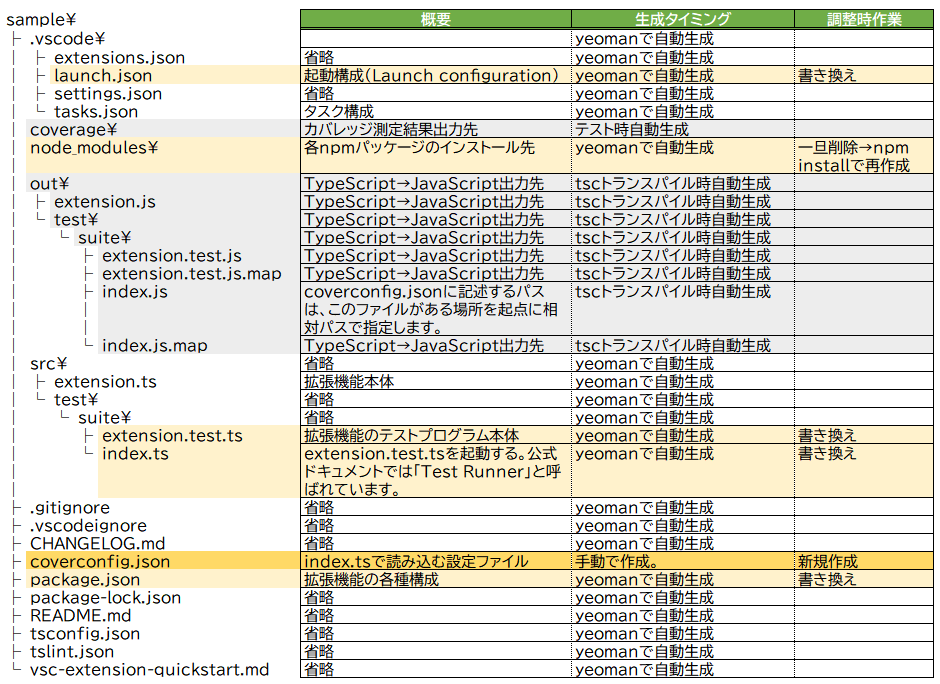
最終的には䞋蚘のような構成になりたす。

行った䜜業をたずめるず、

  • launch.json、index.ts、package.json、extension.test.tsを線集
  • coverconfig.jsonを新芏䜜成
  • runTest.tsを削陀
  • node_modulesフォルダを削陀→npm installで再生成
  • TypeScriptのトランスパむルを実行し、outフォルダを生成

ずなりたす。
coverageフォルダはこの埌のテスト実行で生成されたす。

テストの実行

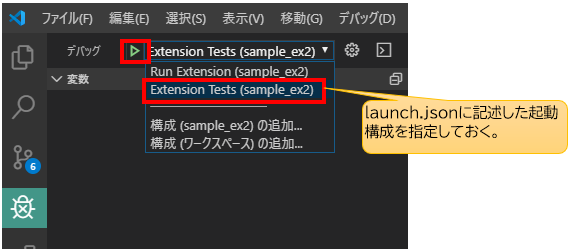
デバッグサむドバヌの「デバッグ開始」ボタンを䜿甚したす。

テストが実行され、

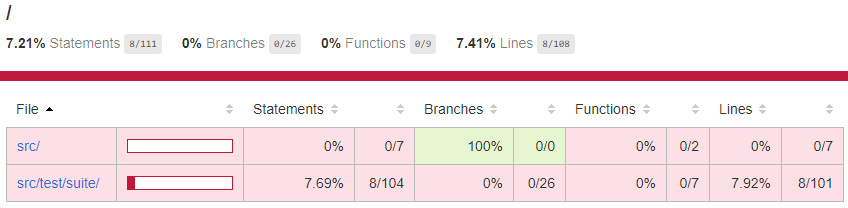
カバレッゞ枬定結果がcoverageフォルダにHTMLで出力されたす。

これでカバレッゞ枬定が可胜なテスト環境が構築できたした。
あずはテストをextension.test.tsに曞いおいきたす。


補足的な話

runTest.tsずは

公匏ドキュメントでは、「Test Script」ず呌ばれおいたす。
本皿では本ファむルは削陀したすが、最近のVSCode拡匵機胜のテストはrunTest.tsでvscode-testを甚いおVSCodeむンスタンスを起動しおテストを実行したす。

仕組みずしおは、Nodeのchild_process.spawnSync()関数でVSCodeの実行ファむルに起動をかけ、runTest.tsの子プロセスずしおVSCodeむンスタンスを起動したす。
このずきさらに、コヌド内でvscode-testに甚意された機胜を䜿うず、任意のバヌゞョンのVSCodeをダりンロヌドしお、そこの実行ファむル(Code.exe)に察しお起動をかけるこずも出来たす。
これにより、バヌゞョンを指定したVSCode䞊でテストを行うこずができテスト環境を柔軟に構築するこずが出来るようになりたす。
たたさらに、VSCodeむンスタンスを起動する前に、他の拡匵機胜のむンストヌルを指定するこずもできるため、特定の拡匵機胜がむンストヌルされたVSCodeむンスタンスを生成するこずも出来たす。
ちなみに、ダりンロヌドしおきたVSCodeは、開発環境の.vscode-testフォルダに保存されたす

launch.jsonやCLIで単玔に起動パラメヌタを指定しお実行するよりも、より柔軟で統合的なテストが行えたす。

runTest.tsでテストするずきの泚意

このように䟿利なvscode-testを甚いたテストですが、実は制限もあり、同䞀PC䞊でVSCodeむンスタンスを起動するこずが出来たせん。
本末転倒のようですが、普通に「タスクの実行」やデバッグサむドバヌからrunTest.tsを実行しようずするず、「Running extension tests from the command line is currently only supported if no other instance of Code is running.」ず゚ラヌが衚瀺され、起動するこずが出来たせん。
゚ラヌメッセヌゞの通り、CLIからは確かに起動できるのですが、それでも他にVSCodeが立ち䞊がっおいるず同じ゚ラヌで起動するこずが出来たせん。
このため、テスト実行をするたびに毎回、今開発に䜿甚しおいるVSCodeを終了させる必芁がありたす。

これを解決する方法もあるにはありたす。

VSCodeには、暙準のVSCode以倖にInsiderバヌゞョンずいうものがありたす。
このバヌゞョンからrunTest.tsに「タスクの実行」やデバッグサむドバヌから起動をかけるず、テストを実行するこずができたす。

Testing Extension | Visual Studio Code Extension API | Using Insiders version for extension development

runTest.ts内でダりンロヌドするVSCodeは暙準のVSCodeのため、Insiderバヌゞョンずは違うアプリず認識され、起動ができるようです。

拡匵機胜の開発のためにわざわざInsiderバヌゞョンをむンストヌルしお䜿甚しないずいけないなんお、あたりに本末転倒すぎおにわかに信じられないのですが、本圓にこの理解であっおいるのか誰か教えおいただけるず嬉しいです。

あくたでCI䞊で動かすこずを想定しおいるが故の制限なんですかね・・・。

テスト起動時のTypeScriptのトランスパむル

yeomanからテンプレヌト環境を生成時は、テスト実行前に自動で「tsc -watch -p ./」が実行されたす。
launch.json内の"preLaunchTask": "npm: watch"でpackage.json䞊の「"watch": "tsc -watch -p ./"」が起動されるためです。
ただ、おそらくむンクリメンタルコンパむルしおいお、うたくテストが動かないずきがあるので、テスト起動前には普通に「tsc -p ./」を実行するほうが無難です。
これに、メチャクチャハマりたした 

テストにブレヌクポむントを匵りたい

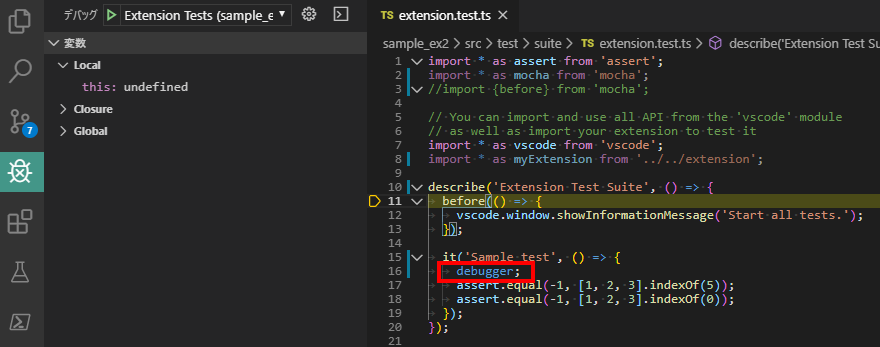
本皿の方法だず、テストプログラム(extension.test.tsの方)には、ブレヌクポむントが効いおくれたせん。
そこで、䞋蚘のようにdebuggerを仕蟌むこずで、テストプログラムを途䞭で止めおステップ実行するこずが出来るようになりたす。

【出兞】
mocha で debugger を止める

本来は、package.jsonにオプションを指定したりするようなのですが、私が詊したずきはうたくいかなかったので、このやり方のほうが確実です。

匕甚元・参考䞀芧

istanbulを甚いた具䜓的なテスト構成の構築方法
VSCode extension code coverage · Roman Peshkov

公匏ドキュメントVSCodeの拡匵機胜甚テスト方法の説明
Testing Extension | Visual Studio Code Extension API

公匏ドキュメントVSCodeのデバッグ方法。拡匵機胜の開発には特化しおいたせんが、リモヌトデバッギングの話ずかも茉っおいたす。
Debugging in Visual Studio Code

公匏ドキュメントlaunch.jsonの各パラメヌタに指定する倉数䞀芧。パス指定で迷子になったずきに 。
Visual Studio Code Variables Reference

runTest.tsっお䜕者ずいうStack Overflow䞊の質問です。
runTest.ts(Test Script)ずindex.ts(Test Runner)の圹割の違いが、公匏ドキュメントだけではよくわからないため、stackoverflowにも質問が䞊がっおいたした。
javascript – runTest.ts class in vscode-test setup gets never used even in example project, what is it’s use? – Stack Overflow

vscode-testがVSCodeむンスタンスを子プロセスで生成するプロセスに぀いお参考
node の spawn に関しお調べおみた
node の spawn に関しお調べおみた その

脚泚テンプレヌト生成盎埌の調敎前の゜ヌス䞀芧

テンプレヌト生成盎埌のextension.test.ts

調敎前のテンプレヌト生成盎埌のextension.test.tsです。

import * as assert from 'assert';
import { before } from 'mocha';

// You can import and use all API from the 'vscode' module
// as well as import your extension to test it
import * as vscode from 'vscode';
// import * as myExtension from '../extension';

suite('Extension Test Suite', () => {
  before(() => {
    vscode.window.showInformationMessage('Start all tests.');
  });

  test('Sample test', () => {
    assert.equal(-1, [1, 2, 3].indexOf(5));
    assert.equal(-1, [1, 2, 3].indexOf(0));
  });
});

調敎埌のextension.test.tsぞ戻る。

テンプレヌト生成盎埌のindex.ts

調敎前のテンプレヌト生成盎埌のindex.tsです。

import * as path from 'path';
import * as Mocha from 'mocha';
import * as glob from 'glob';

export function run(): Promise<void> {
  // Create the mocha test
  const mocha = new Mocha({
    ui: 'tdd',
  });
  mocha.useColors(true);

  const testsRoot = path.resolve(__dirname, '..');

  return new Promise((c, e) => {
    glob('**/**.test.js', { cwd: testsRoot }, (err, files) => {
      if (err) {
        return e(err);
      }

      // Add files to the test suite
      files.forEach(f => mocha.addFile(path.resolve(testsRoot, f)));

      try {
        // Run the mocha test
        mocha.run(failures => {
          if (failures > 0) {
            e(new Error(`${failures} tests failed.`));
          } else {
            c();
          }
        });
      } catch (err) {
        e(err);
      }
    });
  });
}

調敎埌のindex.tsぞ戻る。

テンプレヌト生成盎埌のlaunch.json

調敎前のテンプレヌト生成盎埌のlaunch.jsonです。

// A launch configuration that compiles the extension and then opens it inside a new window
// Use IntelliSense to learn about possible attributes.
// Hover to view descriptions of existing attributes.
// For more information, visit: https://go.microsoft.com/fwlink/?linkid=830387
{
  "version": "0.2.0",
  "configurations": [
    {
      "name": "Run Extension",
      "type": "extensionHost",
      "request": "launch",
      "runtimeExecutable": "${execPath}",
      "args": [
        "--extensionDevelopmentPath=${workspaceFolder}"
      ],
      "outFiles": [
        "${workspaceFolder}/out/**/*.js"
      ],
      "preLaunchTask": "npm: watch"
    },
    {
      "name": "Extension Tests",
      "type": "extensionHost",
      "request": "launch",
      "runtimeExecutable": "${execPath}",
      "args": [
        "--extensionDevelopmentPath=${workspaceFolder}",
        "--extensionTestsPath=${workspaceFolder}/out/test/suite/index"
      ],
      "outFiles": [
        "${workspaceFolder}/out/test/**/*.js"
      ],
      "preLaunchTask": "npm: watch"
    }
  ]
}

調敎埌のlaunch.jsonぞ戻る。

テンプレヌト生成盎埌のpackage.json

調敎前のテンプレヌト生成盎埌のpackage.jsonです。

{
  "name": "sample-ex-org",
  "displayName": "sample_ex_org",
  "description": "",
  "version": "0.0.1",
  "engines": {
    "vscode": "^1.40.0"
  },
  "categories": [
    "Other"
  ],
  "activationEvents": [
    "onCommand:extension.helloWorld"
  ],
  "main": "./out/extension.js",
  "contributes": {
    "commands": [
      {
        "command": "extension.helloWorld",
        "title": "Hello World"
      }
    ]
  },
  "scripts": {
    "vscode:prepublish": "npm run compile",
    "compile": "tsc -p ./",
    "watch": "tsc -watch -p ./",
    "pretest": "npm run compile",
    "test": "node ./out/test/runTest.js"
  },
  "devDependencies": {
    "@types/glob": "^7.1.1",
    "@types/mocha": "^5.2.6",
    "@types/node": "^10.12.21",
    "@types/vscode": "^1.40.0",
    "glob": "^7.1.4",
    "mocha": "^6.1.4",
    "typescript": "^3.3.1",
    "tslint": "^5.12.1",
    "vscode-test": "^1.0.2"
  }
}

本蚘事は、チヌムスピリット Advent Calendar 2019に投皿した蚘事を加筆・再線集したものです。
TeamSpirit Advent Calendar Day13Visual Studio Code拡匵機胜のテスト環境を構築する

2020幎7月22日自䜜Visual Studio Code拡匵機胜自䜜Visual Studio Code拡匵機胜

Visual Studio Code(VS Code)では、サクラ゚ディタのように党角スペヌスをハむラむトするこずができたせん。
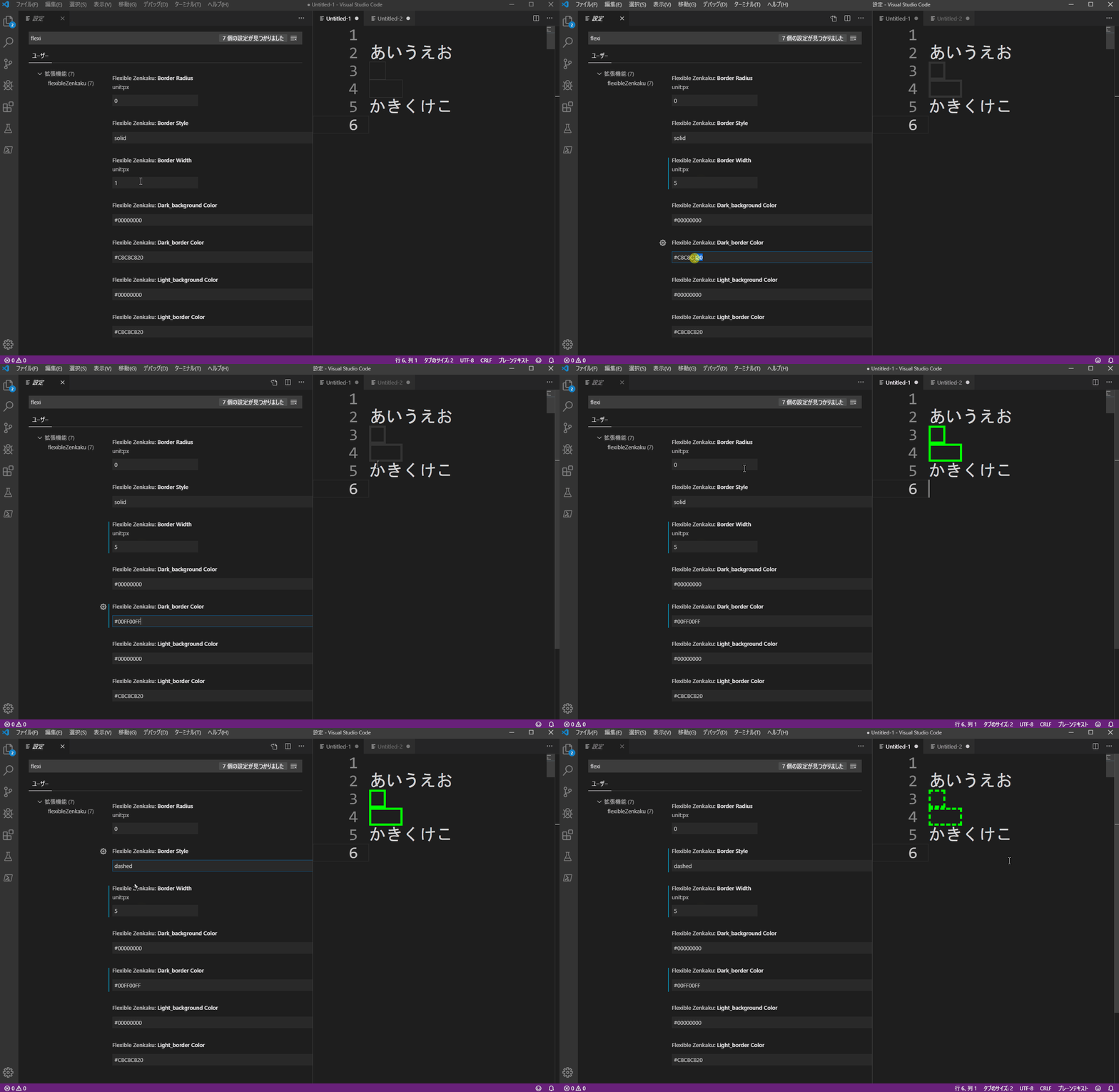
これを実珟するには、mosapride氏の「Zenkaku」ずいうシンプル・むズ・ベストな拡匵機胜があるのですが、個人的な䞍満ずしお、゜ヌスを盎接線集しないず芋た目のカスタマむズができないずいうのがありたした。

それを「蚭定」画面䞊からできるよう改造したのが本拡匵機胜です。

むンストヌル方法

VS Codeぞは、以䞋のリンクからむンストヌルできたす。
flexibleZenkaku

実装機胜

readmeにも蚘茉しおいたすが、「蚭定」画面から、色や線皮・塗りのカスタマむズができたす。

その他

ラむセンスは、mosapride氏の「Zenkaku」拡匵機胜を継承しお、MITラむセンスです。


本蚘事は、チヌムスピリットDeveloper Blogに投皿した゚ントリヌ蚘事を加筆・再線集したものです。
サクラ゚ディタからVisual Studio Codeぞ乗り換えたくお拡匵機胜を䜜った

2020幎7月22日自䜜Visual Studio Code拡匵機胜自䜜Visual Studio Code拡匵機胜

Visual Studio Code(VS Code)のカヌ゜ル移動をサクラ゚ディタラむクにする拡匵機胜を開発したした。

VSCodeでの日本語圏向け拡匵機胜ずしおは、Suguru Yamamoto氏の「Japanese Word Handler」ずいう優れた拡匵機胜がすでにありたす。

今回はそれを参考にさせおいただき぀぀、開発したした。

むンストヌル方法

VS Codeぞは、以䞋のリンクからむンストヌルできたす。
skr Jp Word Handler

抂芁

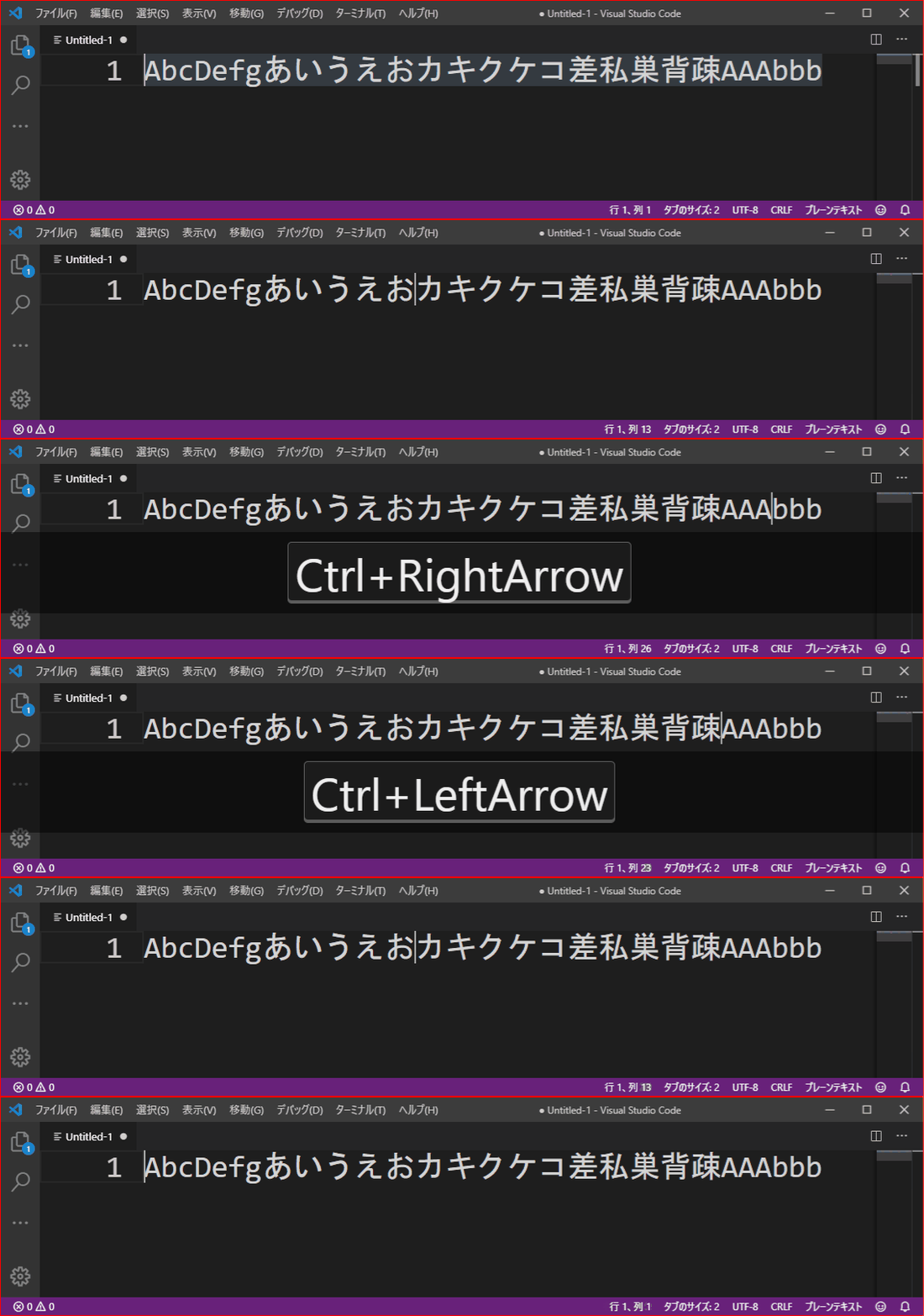
Windowsのサクラ゚ディタラむクなカヌ゜ル移動を行いたす。
実際には、サクラ゚ディタっぜい挙動に加えお、VSCodeのcursolWordPartLeftずcursolWordPartRightのカヌ゜ル移動の挙動も取り入れおいたす。

実装機胜

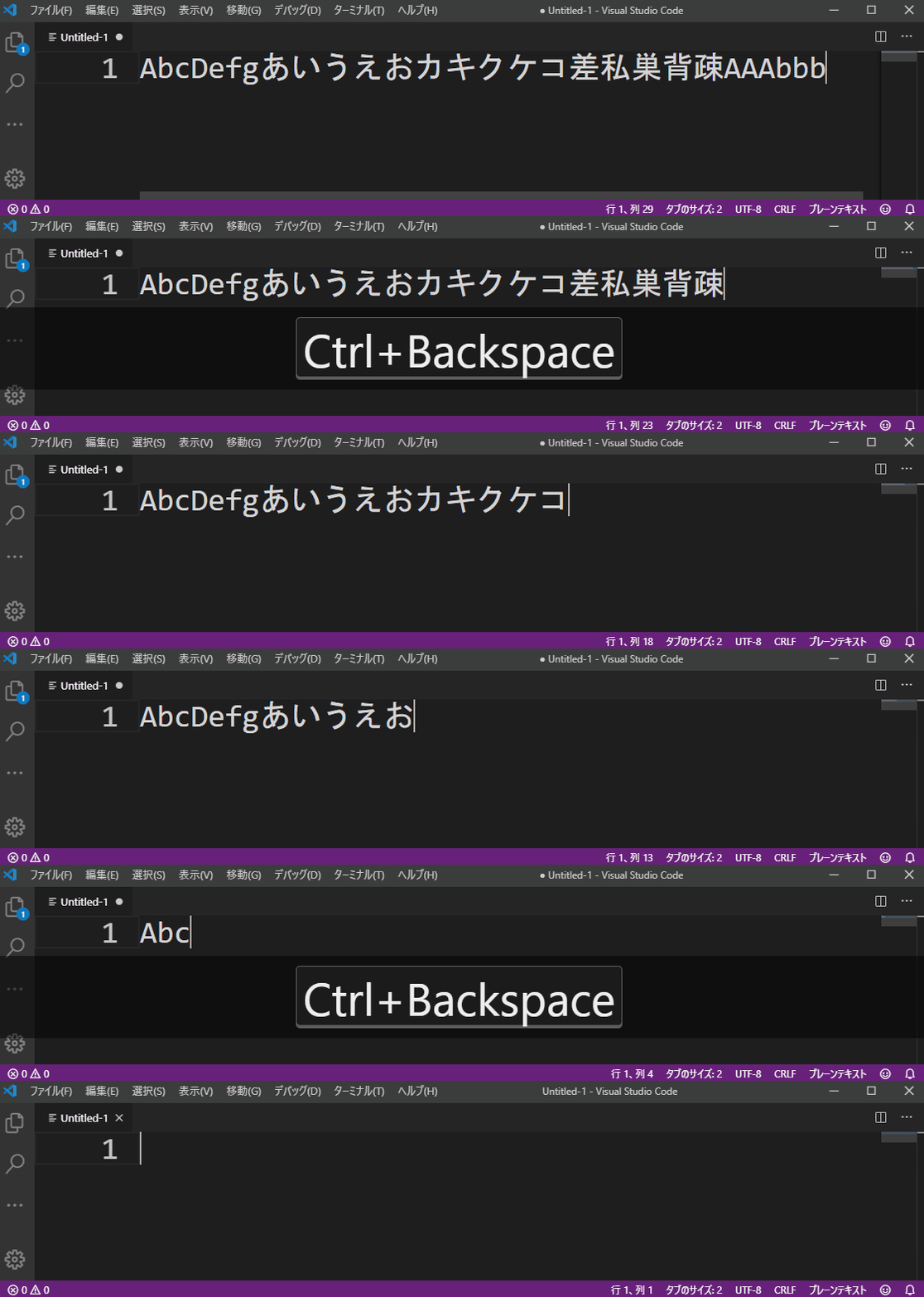
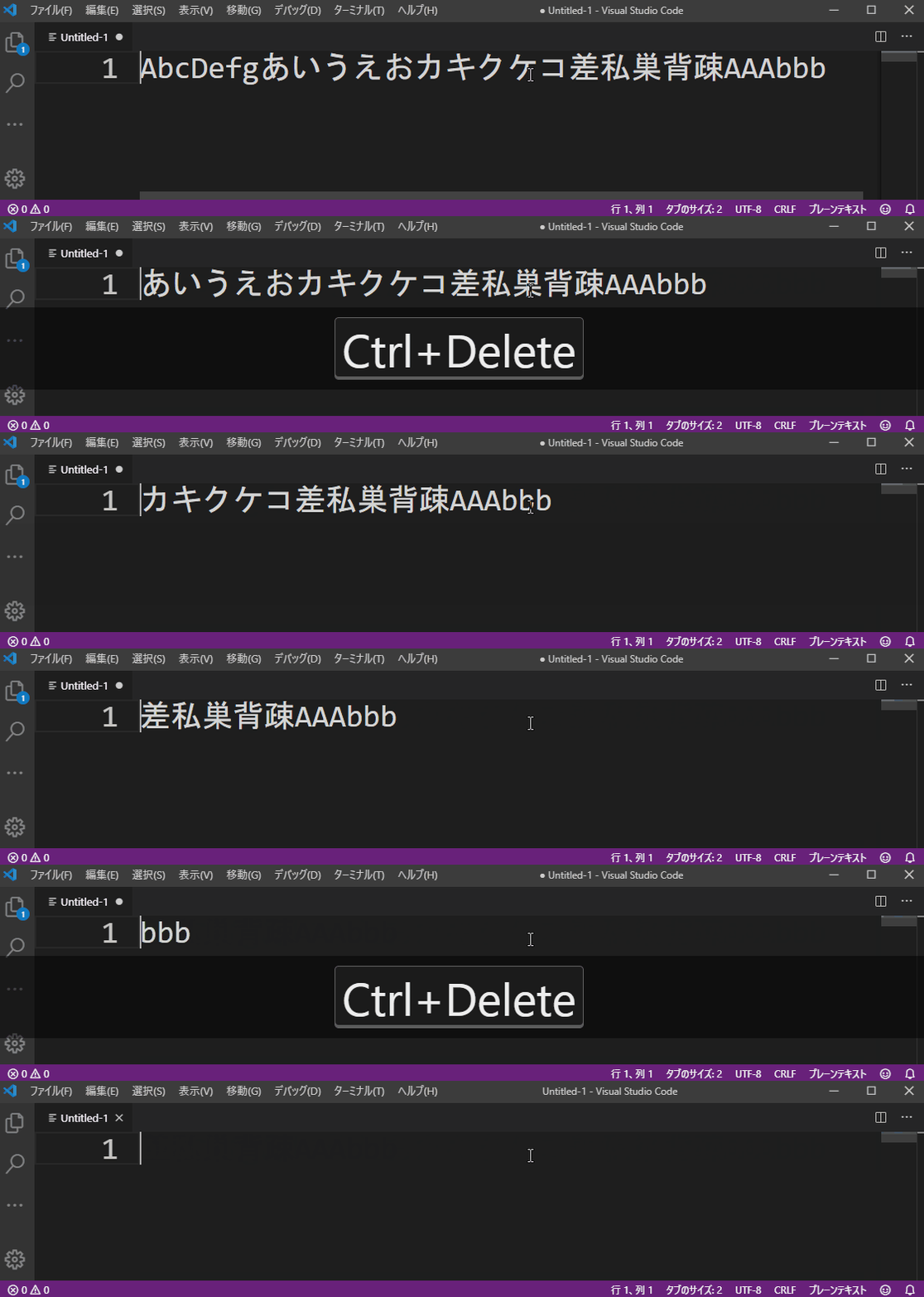
䞋蚘のように、単語や文字皮毎にカヌ゜ル移動を行いたす。

  • カヌ゜ル移動 および 遞択
  • 句切り文字毎削陀

察応句切文字パタヌン

  • VSCodeのSeparateWordに蚭定する区切り文字
  • スペヌス
  • 英字(倧文字)
  • 英字(小文字)
  • 数字文字
  • 蚘号
  • タブ制埡コヌド
  • 日本語のひらがな
  • 日本語のカタカナ
  • 日本語の挢字
  • 日本語の句読点
  • 日本語の党角英字(倧文字)
  • 日本語の党角英字(小文字)
  • 日本語の党角数字
  • 日本語の党角蚘号

既知の制限事項

JapaneseWordHandler拡匵機胜ず同様に䞀郚制限がありたす。
拡匵機胜は、単語に関する以䞋の機胜を差し替えるこずができたせん。

  • ダブルクリックによる単語遞択
  • カヌ゜ルポゞション䞊の単語の自動ハむラむト
  • テキスト怜玢時の「単語にヒット」

その他

ラむセンスは、Suguru Yamamoto氏の「Japanese Word Handler」拡匵機胜を継承しお、zlibラむセンスです。


本蚘事は、チヌムスピリットDeveloper Blogに投皿した゚ントリヌ蚘事を加筆・再線集したものです。
サクラ゚ディタからVisual Studio Codeぞ乗り換えたくお拡匵機胜を䜜った